Today's call
Home shows whether the plan still fits
Overnight recovery (richest on Garmin), form, fitness, load, and today's session on one screen. New watch activities appear as they download, so you decide before you leave the house.
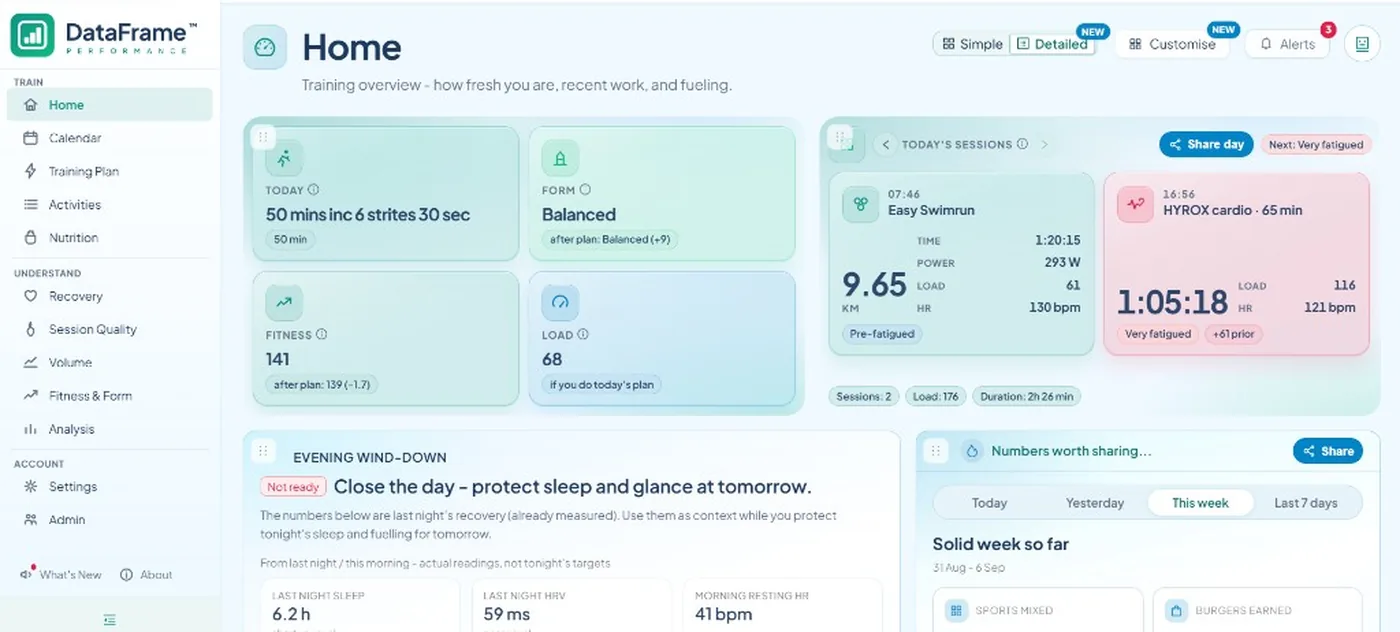
Garmin and Polar tell you what you did. WHOOP tells you how recovered you are. TrainingPeaks tells you what was planned. DataFrame tells you whether today's plan still fits your recovery - and whether the quality of the work is trending the right way.
The decision layer on top of your training stack - Garmin, WHOOP, Polar, TrainingPeaks, and MyWhoosh - free, private, and built for endurance and hybrid athletes.
Today's call
Overnight recovery (richest on Garmin), form, fitness, load, and today's session on one screen. New watch activities appear as they download, so you decide before you leave the house.
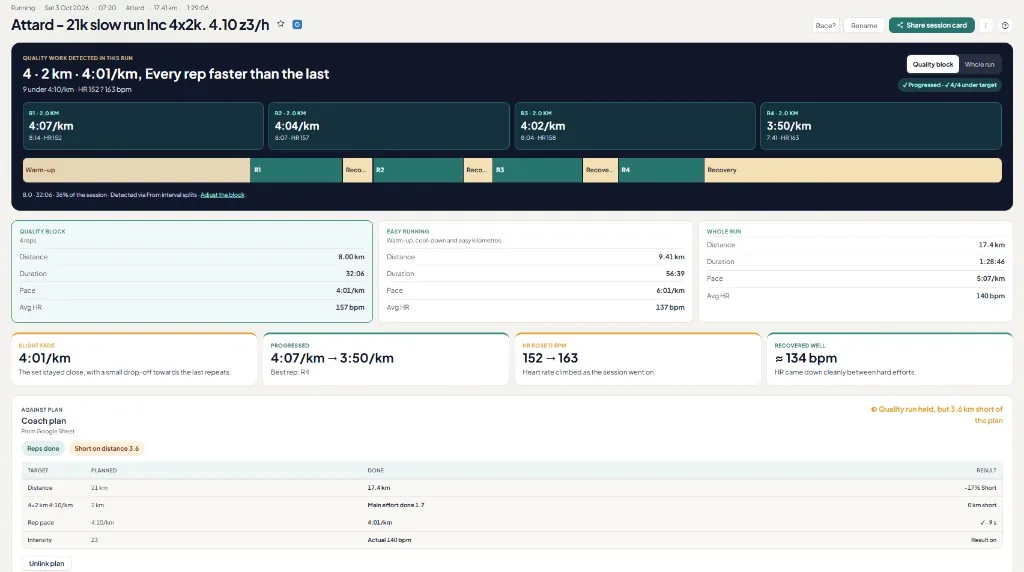
After you train
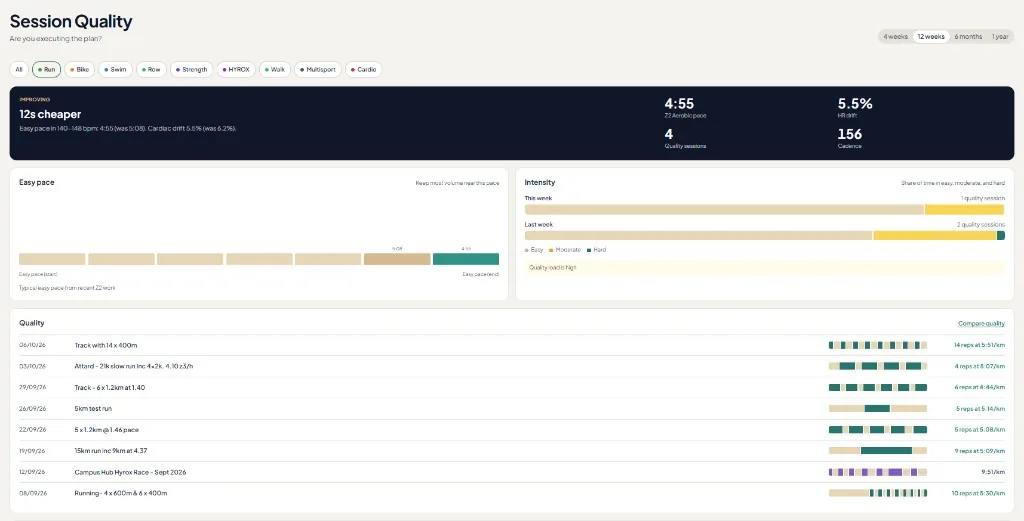
Plan vs done, the hard block, zones, and whether repeats faded. Not only the session average - the quality of the work.
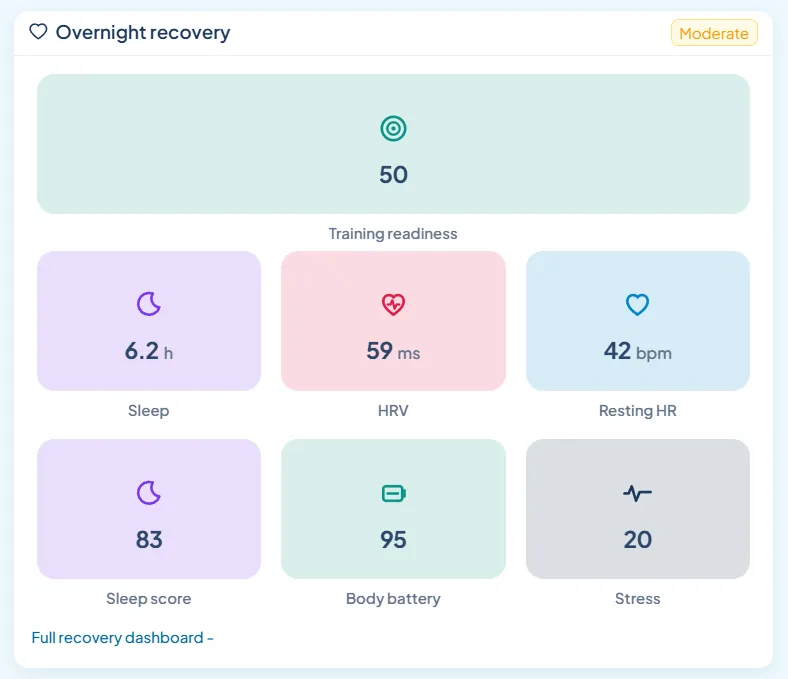
Recovery
Training readiness, sleep, HRV, Body Battery, and stress from Garmin wellness. Polar syncs activities, not these overnight scores - keep Flow for Polar's own recovery views.
Analysis
Matching interval sessions over months: pace, heart rate, and efficiency. Not only last week's average - whether the hard work is moving.
Weeks
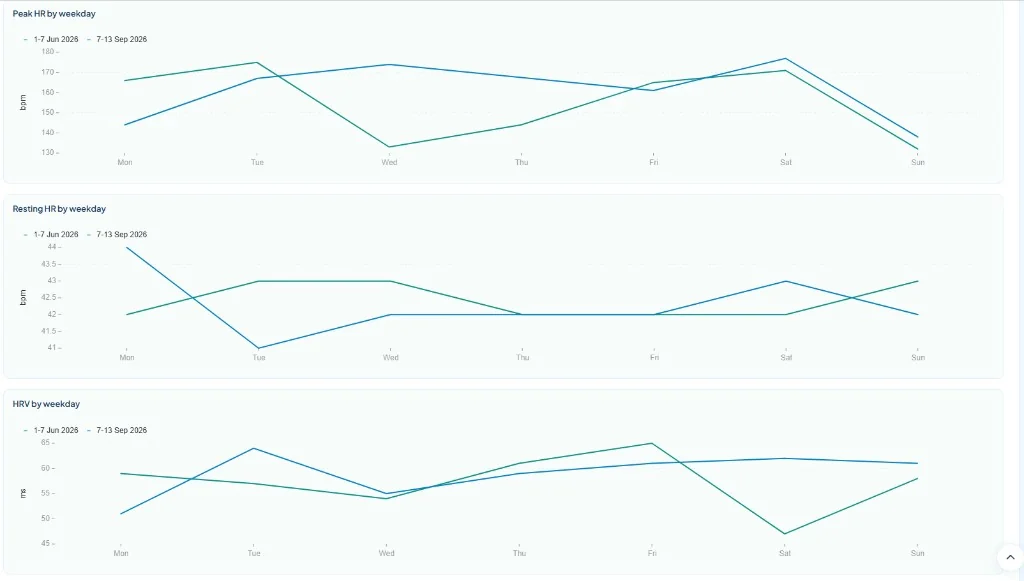
Peak HR, resting HR, and HRV overlay Monday to Sunday. Open Compare weeks from Calendar, or from a race to put the week before next to race week.
Keep your watch app for the device and wellness. Link Garmin Connect (recommended) or Polar as your primary watch - one at a time. WHOOP can sit alongside Garmin for workouts, sleep, recovery and strain. Optionally connect TrainingPeaks for coach plans or TP-only sessions (for example Zwift), and MyWhoosh for indoor rides captured there. DataFrame syncs that into one athlete-owned dashboard - including activity, day, and week share cards.
Deeper coach-facing analysis: quality blocks, week compare, brick fade, CP / W′bal, today's plan with form and fitness, multi-source plan vs actual, hybrid sport framing, plus activity/day/week share cards and privacy-controlled public links. Connect stays the main source for Garmin devices and overnight wellness (sleep, HRV, Body Battery, readiness).
Keep Polar Flow for the Polar watch and Polar's own recovery views. DataFrame imports Polar exercises and FIT charts, then adds quality-block compare, week compare, brick fade, hybrid sports, and share cards on those sessions. Overnight Body Battery and Training Readiness in DataFrame need Garmin. Plan push to Polar is not available yet.
Keep WHOOP for the band, recovery, strain, and sleep. DataFrame adds today's plan check, quality-block compare, week compare, hybrid sports, and share cards. WHOOP can sit alongside Garmin - watch sessions stay on Garmin when both logged the same workout. Overnight recovery prefers WHOOP when it has data for the day. There is no plan push to WHOOP.
Not a TrainingPeaks replacement for athletes, but coaches get a free portal to invite athletes, see who needs a look, assign sessions and blocks, and read recovery against each athlete's own range. The edge is watch-native depth (Garmin recommended, Polar supported), hybrid sports (HYROX / CrossFit), recovery to adaptation, free open sign-in, and share-ready cards. Import TP coach plans and TP-only sessions (deduped against your watch log); MyWhoosh rides replace matching TP-only copies when both are connected.
Supported integrations
Link accounts in Settings. Garmin Connect is the recommended primary watch; Polar is also supported (one watch at a time). WHOOP can sit alongside Garmin for workouts, sleep, recovery and strain - with no plan push to WHOOP. TrainingPeaks and MyWhoosh fill indoor and coach-plan gaps without double-counting the same ride. Google Calendar is a separate opt-in on Calendar. Connect Claude or another AI assistant when you want answers from chat - you choose what it may view or change.
Activities, sleep, Body Battery, HRV, and readiness from your Garmin watch.
Workouts, sleep, recovery and strain. Sits alongside Garmin. Overnight recovery prefers WHOOP when that night exists.
Activities and FIT charts from Polar Flow. Overnight wellness stays in Polar's app or needs Garmin.
Connect Garmin, WHOOP, or Polar. One primary watch at a time. WHOOP sits alongside Garmin.
Coach plans and sessions that land in TP (for example Zwift).
Indoor rides from MyWhoosh - replaces matching TP-only copies.
Write planned sessions, races, and logged activities to a DataFrame.fit calendar.
Ask Claude, ChatGPT, Cursor, or another assistant - you choose what each one may view or change.
AI assistants
Connect Claude from the Claude connectors directory, or ChatGPT, Cursor, and other assistants. You sign in on DataFrame and choose what each one may view or change - then ask about weeks, sessions, or recovery from the chat.
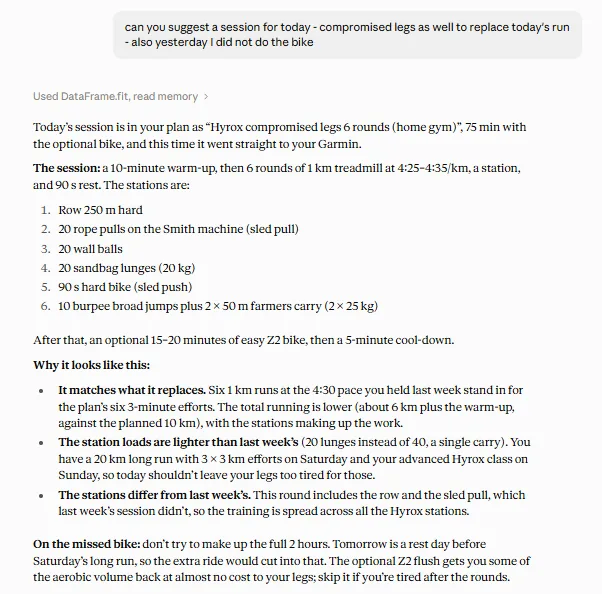
See today's session, how form and fitness may change if you do it, and the expected load.
Compare the intervals across sessions the way coaches talk - not only full-session averages.
Put Monday-Sunday weeks side by side - load, heart rate, sleep, HRV, and Form. Open it from Calendar, or from a race to line up the week before with race week.
Same-day bike-run, strength<->run, and hybrid pairs with a fade label on the second leg.
HYROX and CrossFit tagging, volume splits, bricks, and muscle-map relevance - not buried as "other".
Rename on Garmin from suggested titles - quality recipes like 18km run inc 5 x 400m, or sport-aware names such as HYROX cardio session when you train hybrid.
Add your own workouts on Calendar. A coach on DataFrame can assign sessions there too. Training Plan is for imported Google Sheet, Garmin Coach, and TrainingPeaks, with planned vs done.
On Calendar, connect Google Calendar to add upcoming planned sessions, races, and logged activities to a DataFrame.fit calendar on your phone. Stop anytime - that removes that calendar.
Connect Claude, Cursor, ChatGPT, GitHub Copilot, Codex, Gemini, Grok, DeepSeek, or another assistant. You sign in on DataFrame and choose what it may view or change. Connect more than one, with different access.
Daily burn from Garmin, a protein target from your training type, and a food log - scan a barcode or pick from the list.
Share a single activity, a full training day, or a whole week as social cards - square, portrait, Stories, and transparent PNG. Public activity links with optional hidden HR/power, revoke anytime.
Recovery, Session Quality, and Volume - sleep/HRV, how hard sessions landed, and week-to-week load balance.
Mean-max, CP / W′, W′bal, aerobic decoupling, and W/kg recomputed from your activity warehouse (Garmin plus TrainingPeaks and MyWhoosh gap fills).
A/B/C races, finish estimates, race-week Home mode, and HYROX distances when it matters.
Google sign-in, private per-athlete data, no paid plan - built for athletes who love analysing training.
No. Keep Garmin Connect, WHOOP, or Polar Flow for your watch, band, wellness, and primary activities. Optionally connect TrainingPeaks for coach plans or TP-only sessions (for example Zwift), and MyWhoosh for indoor rides captured there. DataFrame.fit syncs that into one athlete-owned dashboard.
Today's plan check from Garmin recovery, plan your week onto Garmin with plan vs done after structured sessions, quality-block compare, week compare, optional Google Calendar, brick fade, nutrition and protein logging, hybrid sports (HYROX/CrossFit), plus activity, day, and week share cards with privacy-controlled public links. Polar athletes get quality and week views on Polar Flow activities; overnight wellness scores need Garmin.
Yes. There is no paid plan. Sign in with Google, Microsoft, or an email code, then link Garmin Connect, Polar, or WHOOP (and TrainingPeaks or MyWhoosh if you need them) in Settings.
Yes. Garmin Connect is the recommended primary watch source. Sign in, link Garmin in Settings, and sync. DataFrame.fit reads activities and wellness from Connect; it does not replace the Garmin app or your watch.
Yes. Link Polar Flow in Settings as your primary watch instead of Garmin. DataFrame imports recent Polar exercises and FIT charts. Sleep, HRV, Body Battery, and Training Readiness in DataFrame need Garmin - Polar sync does not import those overnight scores yet. Plan push to Polar is not available yet. Connect Garmin or Polar - not both.
Yes. Link WHOOP in Settings to import workouts, sleep, recovery and strain. WHOOP can sit alongside Garmin. When both logged the same workout, the Garmin session stays and you still see WHOOP strain and clock on that page. Overnight recovery prefers WHOOP when it has data for the day. There is no plan push to WHOOP. See DataFrame vs WHOOP and Garmin + WHOOP for the side-by-side.
Yes. Add workouts on Calendar yourself, paste an AI week, take sessions a coach on DataFrame assigns, or pull a Google Sheet, Garmin Coach, or TrainingPeaks calendar on Training Plan. Training Plan is for imported plans; your own sessions and coach assigns go on Calendar. Structured sessions can be sent to Garmin, then plan vs done shows how the session landed after you train. On Calendar you can optionally send upcoming sessions, races, and logged activities to Google Calendar or Outlook.
Yes, if you opt in on Calendar. Connect Google Calendar, Outlook, or both. DataFrame creates a DataFrame.fit calendar and writes upcoming planned sessions, races, and logged activities. Change the plan and those events update. Tap Synced with Google Calendar or Synced with Outlook to stop that calendar. Sign-in never grants Calendar access on its own.
Yes. Claude lists DataFrame.fit in its connectors directory. You can also connect Cursor, ChatGPT, GitHub Copilot, Codex, Gemini, Grok, DeepSeek, or another assistant. It opens DataFrame so you can sign in and choose what that assistant may view or change. You can connect more than one, with different access. The AI / MCP Server page explains how.
Yes. Compare weeks puts two to four Monday-Sunday weeks side by side: load, time, sleep, heart rate, HRV, Form, weather, and the sessions in each week. Open it from Calendar, or from a race to line up the week before with race week. Charts overlay session HR, resting HR, and HRV Monday to Sunday.
Yes. Every sport you can pick in Settings has a public page, including triathlon, duathlon, Swimrun, HYROX, and CrossFit. Same-day pairs such as bike-run, swim-run, or strength-run show as bricks with fade on the second leg, alongside run, bike, swim, and other endurance sports.
Intervals.icu is a strong fitness and power-analytics site. DataFrame.fit is built around watch-native recovery checks, pushing this week's plan onto your Garmin, quality-block compare, week compare, brick fade, hybrid sports such as HYROX, nutrition, and share cards. Many athletes use both.
Endurance, racquet, winter, and multisport: run, bike, swim, row, triathlon, duathlon, Swimrun, HYROX, CrossFit, tennis, padel, pickleball, golf, climbing, skiing, and more. Open Sports in the public menu for the full list. Each sport has its own page.