Connect an AI assistant to DataFrame
Support / Connect an AI assistant to DataFrame
Add DataFrame as an MCP server so Claude, Cursor, GPT-4, Gemini, Grok, DeepSeek, or another assistant can ask about your training and, if you allow it, update workouts, nutrition, and more.
More than one agent
You can connect Claude, Cursor, GPT-4, Gemini, Grok, and DeepSeek at the same time, or any other assistant that supports MCP. Each one has its own permissions. Revoking one does not revoke the others.
Safety
Do not paste an access token into chat. The browser consent screen is how you grant access. If you stop trusting an agent, revoke it in Settings.
Steps
- Add the server - In Claude, Cursor, GPT-4, Gemini, Grok, DeepSeek, or another AI assistant, add a remote server with the URL https://dataframe.fit/api/mcp.
- Sign in on DataFrame - The agent opens dataframe.fit in your browser. Sign in with Google if you are not already signed in.
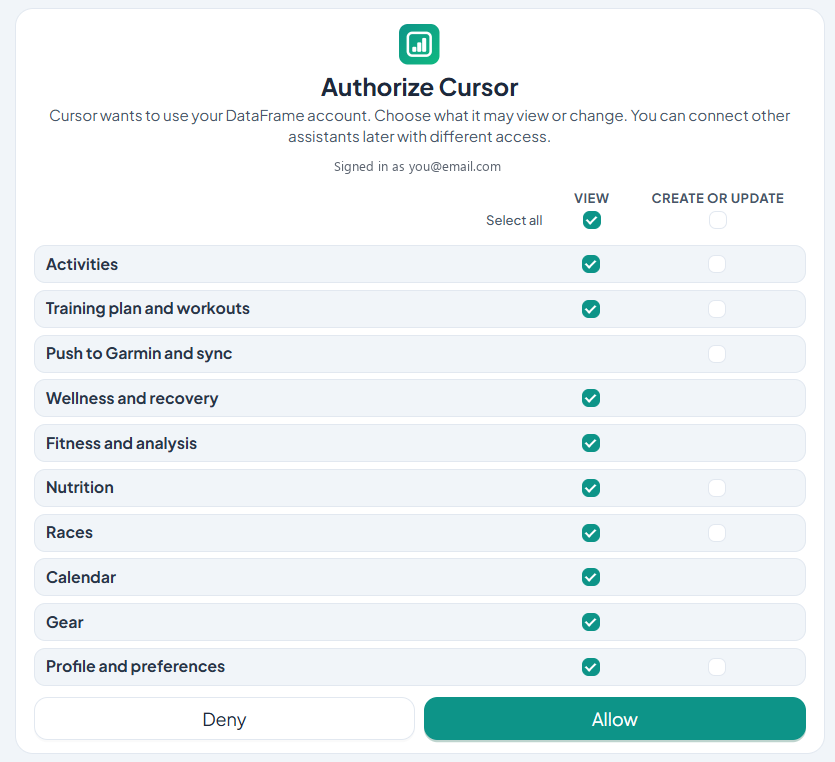
- Choose access - Tick what that agent may view or change. Viewing starts selected. Changes, and push to Garmin, stay off until you tick them.
- Return to the agent - Allow the connection. You go back to the agent. It can only use the permissions you granted.
- Manage later - Settings, Connections, Connected AI agents lists every agent. Change access or revoke one without affecting the others.

Related articles
Like what you see?
DataFrame.fit is free. Sign in with Google, link Garmin Connect, and use the same how-tos on your own training.
Continue with Google - See how DataFrame works
More about DataFrame.fit
- Home
- About
- Support
- How it works
- Screens
- Google Calendar
- AI / MCP
- Common questions
- vs Garmin
- vs TrainingPeaks
- Garmin analytics
- All sports
- Privacy
- Terms
- Sign in
- llms.txt
© 2026 DataFrame™. All rights reserved.
This project is currently fully supported by Scope (www.scope.mt).
DataFrame™ is a non-commercial personal project. It is not affiliated with, endorsed by, or connected to Garmin, TrainingPeaks, Peaksware, or other fitness brands.