What an AI agent can do on DataFrame
Support / What an AI agent can do on DataFrame
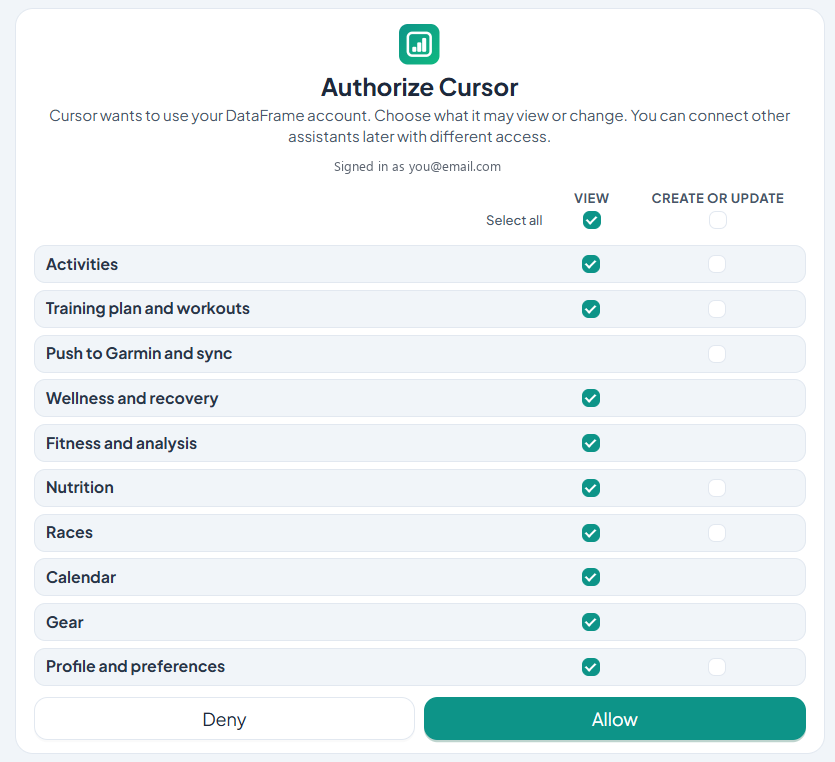
Permissions for the DataFrame MCP: activities, plan, nutrition, wellness, races, and push to Garmin.
View and change
Each area has a view permission. Some also have a change permission. Viewing is selected for you. Changing data stays off until you tick it.
- Activities - list and open sessions, quality-block and interval split paces, or rename them
- Training plan and workouts - read the week, or create and edit workouts
- Nutrition - read the food log, or update a day
- Wellness and recovery - sleep, HRV, and today's recovery
- Fitness and analysis - form, fitness, and load
- Races - read the race list, or add and edit races
- Calendar, gear, and preferences - view, and change preferences if you allow it
Push to Garmin
Editing a workout in DataFrame does not send it to your watch. Push to Garmin and sync is a separate tick. Leave it off if you only want the agent to draft the plan inside DataFrame.
Related articles
Like what you see?
DataFrame.fit is free. Sign in with Google, link Garmin Connect, and use the same how-tos on your own training.
Continue with Google - See how DataFrame works
More about DataFrame.fit
- Home
- About
- Support
- How it works
- Screens
- Google Calendar
- AI / MCP
- Common questions
- vs Garmin
- vs TrainingPeaks
- Garmin analytics
- All sports
- Privacy
- Terms
- Sign in
- llms.txt
© 2026 DataFrame™. All rights reserved.
This project is currently fully supported by Scope (www.scope.mt).
DataFrame™ is a non-commercial personal project. It is not affiliated with, endorsed by, or connected to Garmin, TrainingPeaks, Peaksware, or other fitness brands.