Add sessions to Google Calendar
Support / Add sessions to Google Calendar
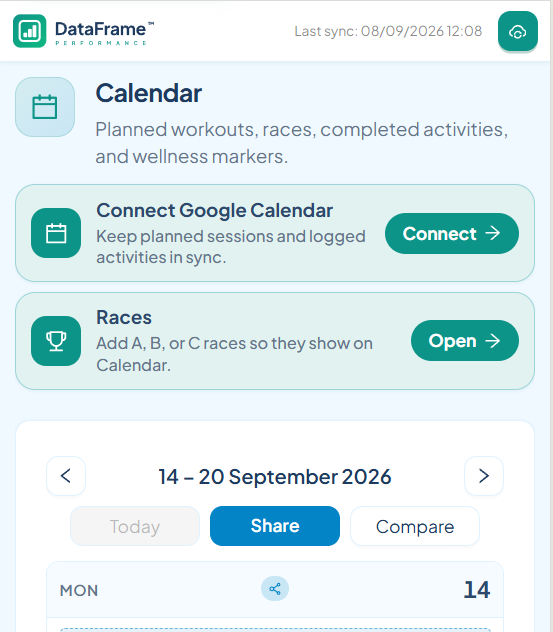
How optional Google Calendar sync works in DataFrame.fit. On Calendar, connect Google Calendar to write upcoming planned sessions, races, and logged activities to a DataFrame.fit calendar on the Google account you signed in with.
What we write
This is optional. After you opt in, DataFrame creates a calendar named DataFrame.fit and writes only onto that calendar. We do not read your meetings or other calendars.
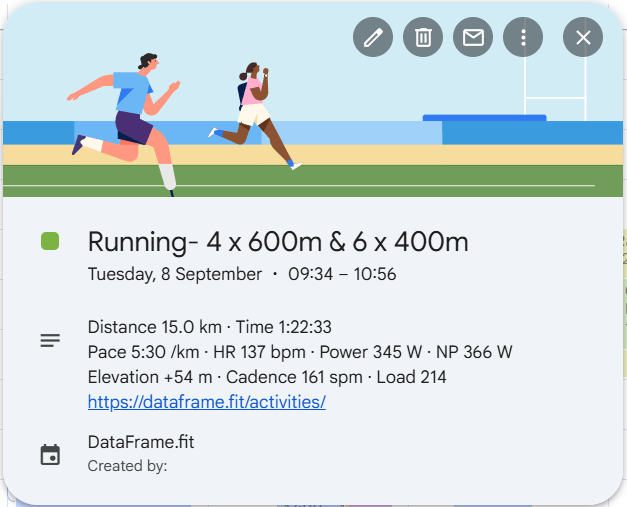
Upcoming planned sessions and races go on as all-day events for about the next four weeks. Logged activities from the last four weeks are written as timed events. Notes use labels such as Distance, Time, Pace, Speed, HR, Power, and Load, plus a link back to the session in DataFrame.fit. History from before you opted in is not dumped.
Same Google account
Calendar connect is pinned to the Google account you used to sign in. If Google offers a different account, go back and pick the one on your DataFrame profile.
Privacy
The full policy is on the public Privacy page. In short: we store a refresh token so we can keep writing, we do not sell Google user data, and stopping sync deletes the DataFrame.fit calendar.
Steps
- Open Calendar - Sign in, then open Calendar. Use Connect Google Calendar on that page. Sign-In never grants Calendar access on its own.
- Allow Calendar access - Google asks for permission to create a DataFrame.fit calendar. Use the same Google account you signed in with.
- Check Google Calendar - Upcoming planned sessions and races appear as all-day events. Logged activities from the last four weeks are timed events with distance, time, pace or speed, heart rate, power, and load in the notes, plus a link back to DataFrame.fit.
- Keep it in sync - Change the plan or a race in DataFrame and those Google events update. After a Garmin activity syncs, we write a timed event or update the matching planned event.
- Stop anytime - Tap Synced with Google Calendar on Calendar. That revokes access and deletes the DataFrame.fit calendar. Other Google calendars are left as they are.
Related articles
Like what you see?
DataFrame.fit is free. Sign in with Google, link Garmin Connect, and use the same how-tos on your own training.
Continue with Google - See how DataFrame works
More about DataFrame.fit
- Home
- About
- Support
- How it works
- Screens
- Google Calendar
- Common questions
- vs Garmin
- vs TrainingPeaks
- Garmin analytics
- All sports
- Privacy
- Terms
- Sign in
- llms.txt
© 2026 DataFrame™. All rights reserved.
This project is currently fully supported by Scope (www.scope.mt).
DataFrame™ is a non-commercial personal project. It is not affiliated with, endorsed by, or connected to Garmin, TrainingPeaks, Peaksware, or other fitness brands.