Compare weeks
Support / Compare weeks
How week compare works in DataFrame.fit. Put two to four Monday-Sunday weeks side by side - training load, heart rate, sleep, HRV, Form, weather, and the sessions in each week. Open it from Calendar or a race.
Weeks, not rolling days
A week here is Monday to Sunday, the same as Calendar. ISO week numbers are a label only. This week stays marked as in progress until Sunday, so a lower load is not a surprise.
Race weeks
The week of a race and the week before it are tagged when you have races saved. That is the usual compare: the last build week next to race week, or the week before one race next to the week before another.
What the numbers mean
Training totals add sessions. Sleep, HRV, and other recovery numbers are averages of the days that have data. Weather is an average of sessions that recorded it - rest days do not have weather. Form in and Form out are CTL, ATL, and TSB entering Monday and leaving Sunday.
Heart-rate charts
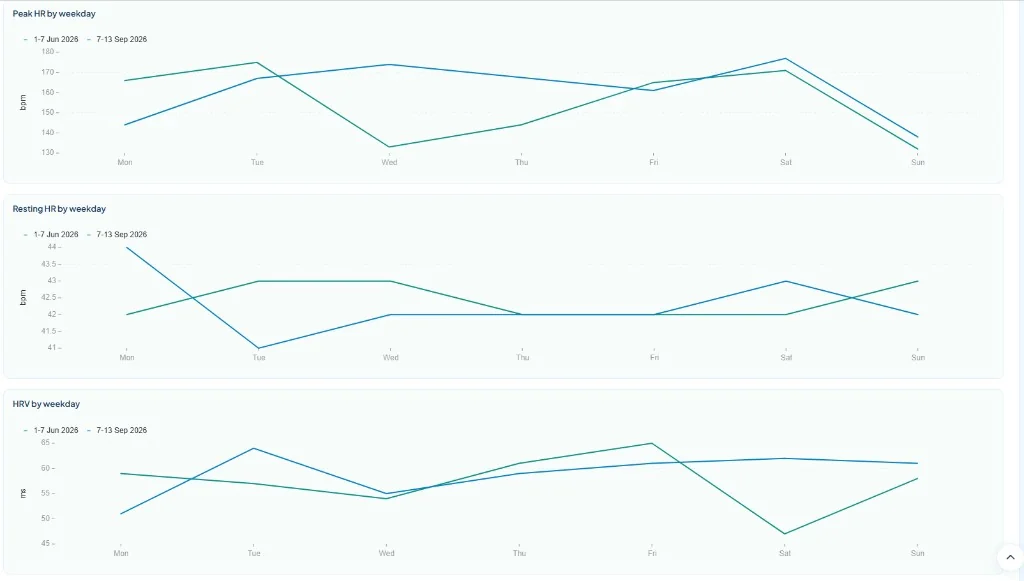
Week bars show average vs peak session HR, and resting HR, for each column. Lines overlay Monday to Sunday so you can see how a race week actually ran: session HR, peak HR, resting HR, and overnight HRV. Days without a session or a reading are skipped, so a rest day does not invent a number.
Steps
- Open Compare weeks - From Calendar, tap Compare week. Or open a race and tap Compare race weeks.
- Pick the weeks - The page starts with last week vs this week. Use the calendar picker, shortcuts, or a race to change columns. Add up to four weeks.
- Read the table - Green cells are the best value in that row. Easy mode shows load, time, sleep, HRV, and Form as tiles. Charts overlay session HR, resting HR, and HRV Monday to Sunday. Tap a session to open it.
Related articles
Like what you see?
DataFrame.fit is free. Sign in with Google, link Garmin Connect, and use the same how-tos on your own training.
Continue with Google - See how DataFrame works
More about DataFrame.fit
- Home
- About
- Support
- How it works
- Screens
- Google Calendar
- AI / MCP Server
- ChatGPT
- Common questions
- vs Garmin
- vs Polar
- vs TrainingPeaks
- Garmin analytics
- All sports
- Privacy
- Terms
- Sign in
- llms.txt
© 2026 DataFrame™. All rights reserved.
This project is currently fully supported by Scope (www.scope.mt).
DataFrame™ is a non-commercial personal project. It is not affiliated with, endorsed by, or connected to Garmin, TrainingPeaks, Peaksware, or other fitness brands.